
Step-By-Step-Guide
Step 1: Scan the QR Code
Scan the QR code on your table using your phone camera or Google Camera to automatically load the restaurant’s menu in the Orderlay app.
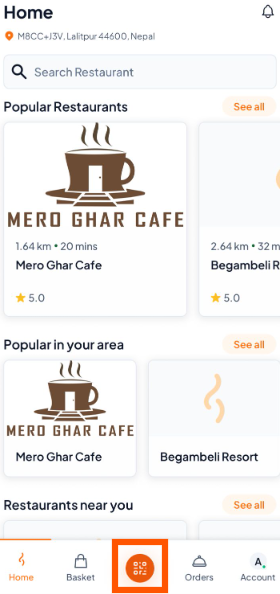
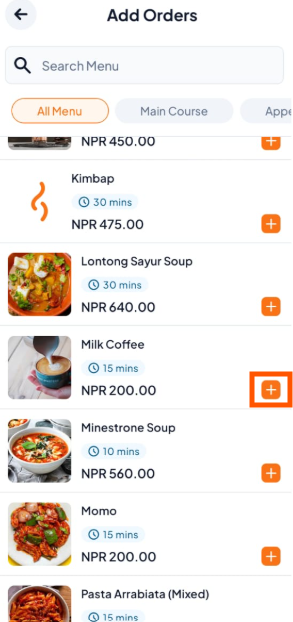
Step 2: Browse and Select Your Items
Tap on (+) button (e.g., Milk Coffee)
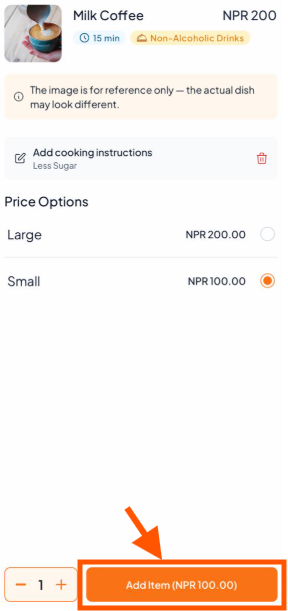
Step 3: Customize Your Item (Optional)
Add special instructions like "Less Sugar" and Tap "Add Item" when you're done.
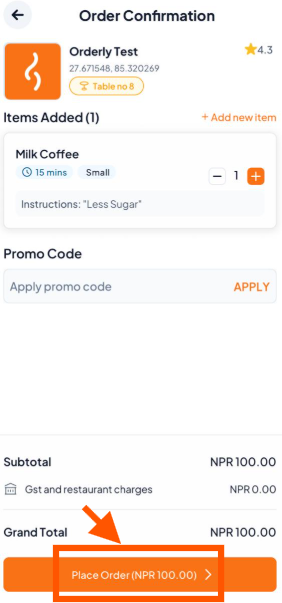
Step 4: Review Your Orders and Click on "Place Order".
Step 5: Track Your Order Status
After placing your order, you can track its progress through the stages:
Confirmed → Preparing → Served
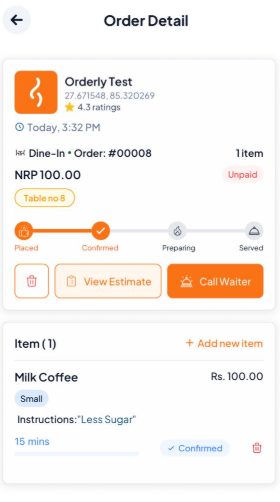

Need help? Use Call Waiter anytime for assistance.
Want to check your bill? Tap View Estimate to see your order summary