
Setting up your restaurant profile for the first time? You can add your business hours directly in the setup form while Creating Your Restaurant Profile.
1. Set Your Hours for Each Day
You will see a list of all the days of the week and an option to set time.
Tap the Open/Close button to set whether the restaurant is open or closed.
Tap on the first time (e.g., 08:00) to select your opening time.
Tap on the second time (e.g., 22:00) to select your closing time.
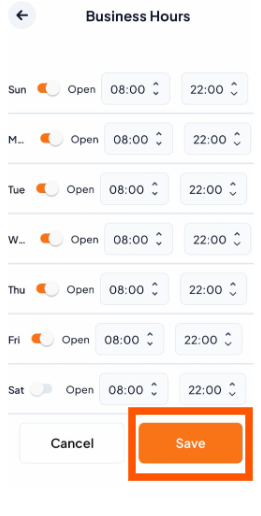
Once you have set the hours for all days, scroll down and tap the "Save" button.