Go to the top-right corner of the screen.
Click on your Profile / Restaurant Name.
Select "Restaurant Settings" from the dropdown.
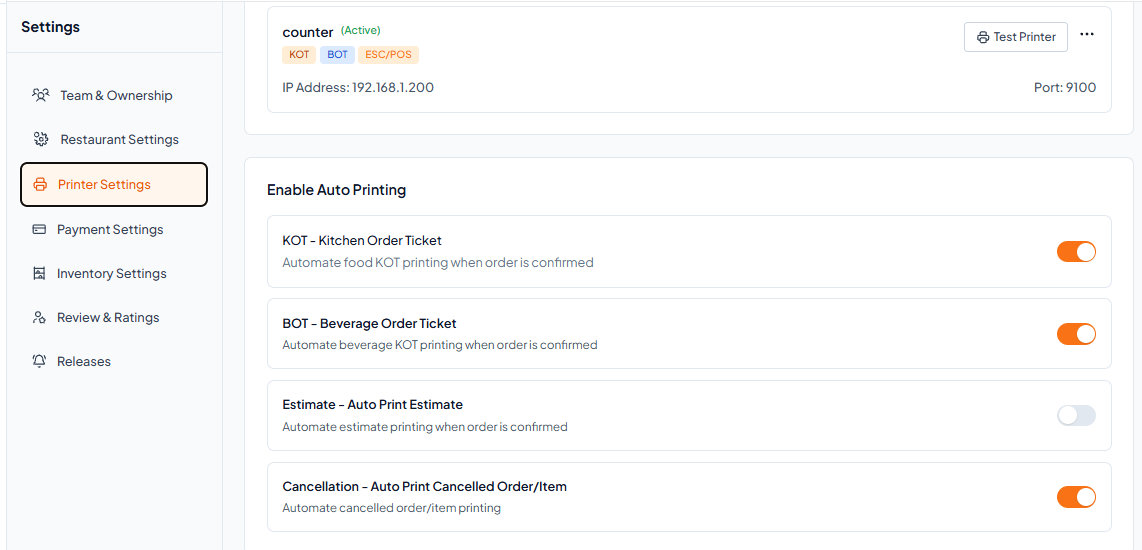
Click on "Printer Settings".
You will see the toggles for KOT, BOT, Estimate and Cancel.
Toggle ON the ones you want to auto-print, and Toggle OFF the ones you don't.
Toggle | Function |
|---|---|
KOT | Automatically prints the kitchen order ticket when an order is confirmed. |
BOT | Automatically prints the beverage order ticket at the bar station. |
Estimate | Automatically prints the bill estimate when an order is confirmed. |
Cancle | Automatically prints the cancel order or item when an order is canceled. |