company logo

Help center

Go to Orderlay
All collections2. Knowledge BasePrinter Setup and Troubleshooting Guide Orderlay Printer SupportEnable Auto Printing Kot, Bot and Estimate (App)

Enable Auto Printing Kot, Bot and Estimate (App)

Set up automatic printing for KOT, BOT, and estimates in Orderlay.

Step-By-Step-Guide

  1. Tap on "More" in the app menu.

  2. Under Restaurant Settings, tap on "Printer Settings".

  3. You will see the toggles for KOT, BOT, Estimate and Cancel.

  4. Toggle ON the ones you want to auto-print, and Toggle OFF the ones you don't.
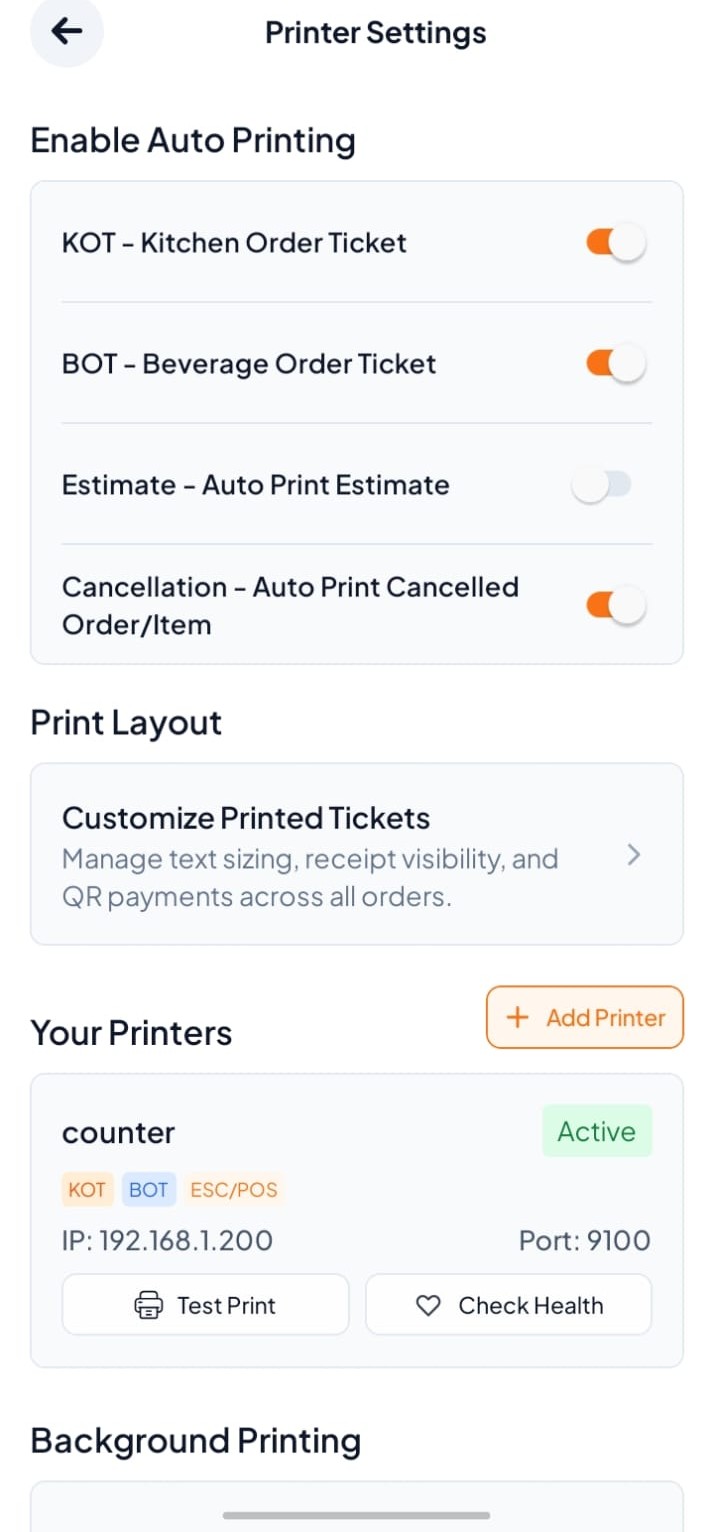
Printer Settings screen shows auto-print toggles, printed ticket layout options, an active counter printer with test and health buttons, and the Background Printing section. Visible: Printer Settings, Enable Auto Printing, KOT - Kitchen Order Ticket, BOT - Beverage Order Ticket, Estimate - Auto Prin

What Each Toggle Does

Toggle

Function

KOT

Automatically prints the kitchen order ticket when an order is confirmed.

BOT

Automatically prints the beverage order ticket at the bar station.

Estimate

Automatically prints the bill estimate when an order is confirmed.

Cancle

Automatically prints the cancel order or item when an order is canceled.

Did this answer your question?
😞
😐
😁