Step-By-Step-Guide
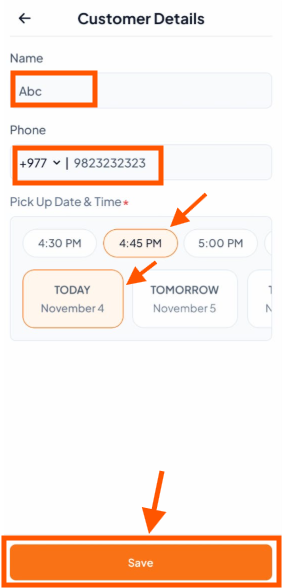
Step 1: Enter Customer Name
Type the customer's name (e.g., "Abc")
Step 2: Enter Phone Number
Enter the customer's phone number (e.g., "+977 9873232323")
Step 3: Choose Pick-Up Time
Select from available time slots (e.g., 4:30 PM, 4:45 PM, 5:00 PM)
The selected time will be highlighted
Step 4: Select Pick-Up Date
Choose TODAY, TOMORROW, or any other day.
Step 5: Save Information
Tap the "Save" button at the bottom to confirm all details