
Step-By-Step-Guide
Step 1: Fill Customer Information
Name: Enter customer name (e.g., "Abc")
Phone: Enter phone number (e.g., "+977 9898989898")
Delivery Location: Enter full address (e.g., "Kumaripati, Lalitpur, Nepal")
Landmark (Optional): Add nearby landmark if needed (e.g., "Near Ufo")
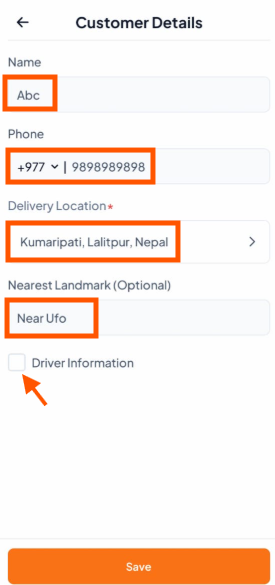

If you need to add driver details, tick the "Driver Information" box to open the driver form and enter the required information.

Step 2: Add Driver Information
Driver Name: Enter driver's name (e.g., "Orderlay Driver")
Phone: Enter driver's contact number
Delivery Partner: Select or enter service name (e.g., "Foodmandu")
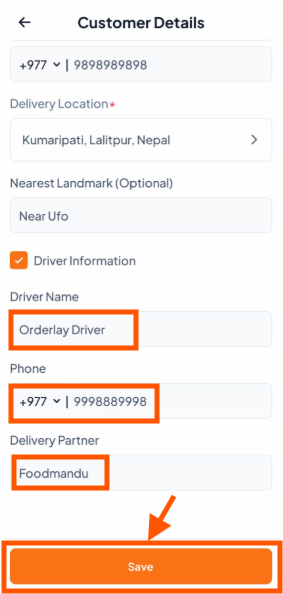
Tap "Save" to confirm all information
Tip: Always double-check the phone number to ensure you can contact the customer if needed.
(O